The Moz Model Context Protocol (MCP) server
lets LLM hosts (such as Claude Desktop, ChatGPT Desktop, and coding agents like
Claude Code) call the Moz APIs directly tools. Instead of writing code against
our API, you connect the MCP server to your AI client and ask questions in
natural language; the client calls the appropriate Moz tools on your behalf.
Beta!
The Moz MCP server is currently in beta.
Access is limited to account owners today. We are actively working to expand
access to seated users.
Endpoints
The MCP server exposes two endpoints, split by product. You can connect one or
both, depending on the products you subscribe to. Each requires a valid
subscription to the corresponding product.
The suggested name is the label to enter when adding the server in a client
like Claude Desktop or ChatGPT Desktop.
Moz Data
The Data endpoint exposes Moz Data API tools for SEO data: site metrics, links,
keywords, rankings, and more.
There are two ways to authenticate the MCP server.
OAuth (recommended)
Both endpoints support authentication through OAuth directly inside your
client. When you add the server in a client like Claude Desktop or ChatGPT
Desktop, the client will walk you through the OAuth sign-in flow. This is the
recommended path for most users.
Manual connection with a Bearer token
If you prefer to connect manually with a token or your client does not support
OAuth, you can authenticate with an HTTP header:
Authorization: Bearer <YOUR_MOZ_TOKEN>
The token value is your Moz API key, which you can find in the Moz API
dashboard at moz.com/api/dashboard. The same
token works against both the Data and Local endpoints.
Connecting a client
Claude Desktop
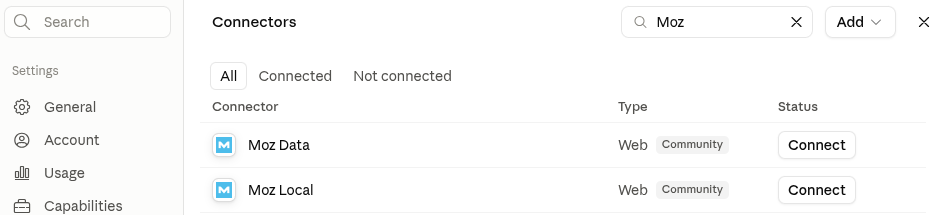
The easiest way to connect is straight from Claude's built-in connector
directory. Moz Data and Moz Local are both published there.
Open Settings → Connectors in Claude Desktop.
Search for Moz.
Click Connect next to Moz Data or Moz Local and complete the
OAuth sign-in flow.
Other clients (ChatGPT Desktop, etc.)
If your client does not list Moz in a connector directory, add a new MCP (or
"connector") server manually in its settings and enter:
Name: the suggested name from above:
moz-mcp-v1-data
moz-mcp-v1-local
URL: the matching MCP URL from above:
https://api.moz.com/mcp/v1/data
https://api.moz.com/mcp/v1/local
Claude Code
In Claude Code you can connect either endpoint
using OAuth or with a manually supplied token.
OAuth
Add the server without an auth header, then run /mcp inside Claude Code to
complete the OAuth sign-in flow when prompted:
claude mcp add moz-mcp-v1-data https://api.moz.com/mcp/v1/data \
  --transport http \
  --scope user
Manually supplied token
Supply your Moz API key as a Bearer token header:
claude mcp add moz-mcp-v1-data https://api.moz.com/mcp/v1/data \ --transport http \ --header "Authorization: Bearer $YOUR_MOZ_TOKEN"\ --scope user
Set YOUR_MOZ_TOKEN in your environment to the API key from
moz.com/api/dashboard before running the
command.
To add the Local endpoint instead, swap the name and URL. Use moz-mcp-v1-local
and https://api.moz.com/mcp/v1/local in either command above.